# vue-flash-message
[](https://vuejs.org/index.html)
[](https://github.com/smwbtech/vue-flash-message/blob/master/LICENSE.md)
[](https://travis-ci.org/smwbtech/vue-flash-message)
[](https://coveralls.io/github/smwbtech/vue-flash-message?branch=master)
[](https://bundlephobia.com/result?p=@smartweb/vue-flash-message@latest)
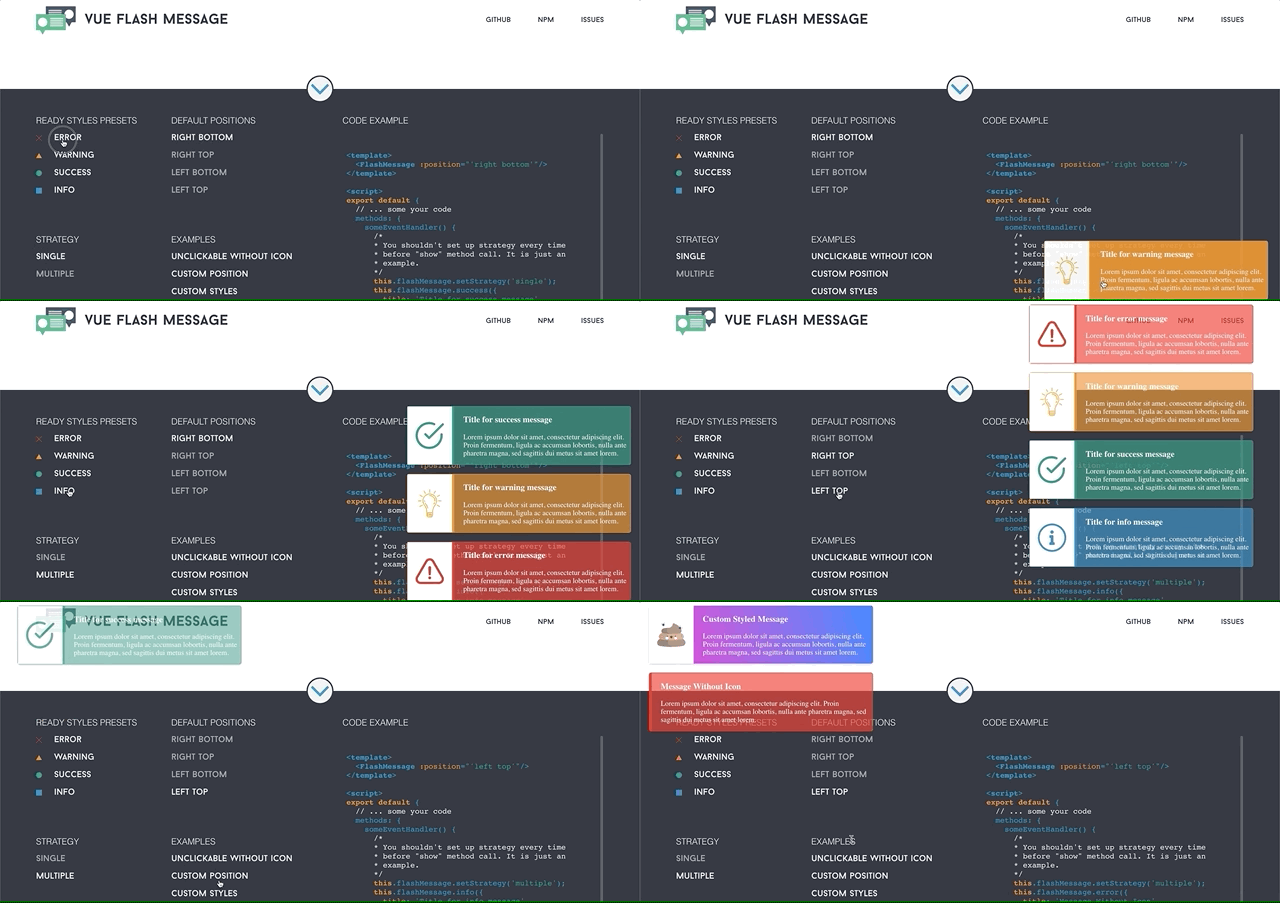
The component to display single flash message or multiple flash messages to user. It has styles presets, but can be easily customized by passing style object as argument.
#### [Live Demo](https://smwbtech.github.io/vue-flash-message/)
#### [Docs](https://smwb-tech.gitbook.io/vue-flash-message/)
## Setup
```
npm i @smartweb/vue-flash-message
```
## Installation and Configuration
Register the component in your app entry point (main.js or as you called it)
```javascript
import Vue from 'vue';
import FlashMessage from '@smartweb/vue-flash-message';
Vue.use(FlashMessage);
```
You can pass [configuration object](#configuration-object) as second argument
```javascript
Vue.use(FlashMessage, config);
```
### Nuxt.js
Create vue-flash-message.js file in plugins directory and put the following code:
```javascript
import Vue from 'vue';
import VueFlashMessage from '@smartweb/vue-flash-message';
Vue.use(VueFlashMessage);
```
In your nuxt.config.js file register your plugin
```javascript
{
/* Since Nuxt.js 2.4, mode has been introduced as option of plugins to specify plugin type, possible value are: client or server. ssr: false will be adapted to mode: 'client' and deprecated in next major release.
More info: https://nuxtjs.org/guide/plugins#client-side-only */
plugins: [{ src: '~/plugins/flash-message.js', mode: 'client' }]
},
```
### Configuration object
---
| Property | Type | Description | Default |
| ------------ | ---------- | ------------------------------------------------------------------------------------------------- | -------------- |
| **name** | **String** | It is a name of the component and alias for the EventBus global property. | 'flashMessage' |
| **tag** | **String** | Custom tag for the component to use in your application. | 'FlashMesage' |
| **time** | **Number** | Duration (in ms) of the message display (can be customized during message call). | 8000 |
| **strategy** | **String** | You can pass 'single' or 'multiple' to choose the default strategy. It can be changed in process. | 'single' |
## Usage
Put the component into your template
```html
```
You can pass a string as position property to set up default position of messages block. Valid values: **'right bottom'**, **'right top'**, **'left bottom'**, **'left top'**.
```html
```
Now you can access flash message by using global EventBus alias (that is "flashMessage" by default) of your Vue instance
```javascript
this.flashMessage.show({
status: 'error',
title: 'Error Message Title',
message: 'Oh, you broke my heart! Shame on you!'
});
```
## Methods
### Display Methods
---
Every display message method will return the id of the message instance
```javascript
this.flashMessage.show({
status: 'error',
title: 'Error Message Title',
message: 'Oh, you broke my heart! Shame on you!'
});
```
You also can use shorthands without status property.
```javascript
this.flashMessage.error({
title: 'Error Message Title',
message: 'Oh, you broke my heart! Shame on you!'
});
this.flashMessage.warning({
title: 'Warning Message Title',
message: "Don't stop me nooooow....!"
});
this.flashMessage.info({
title: 'Info Message Title',
message: 'Just want you to know, that Vue is so cool'
});
this.flashMessage.success({
title: 'Success Message Title',
message: 'Hoorah, it is my fist npm package and it works!'
});
```
You can pass the [data object](#data-object) to configure a message instance.
### Data Object
---
The first argument - is data object.
| Property | Type | Description |
| ----------------- | ----------- | ------------------------------------------------------------------------------------------------------------------------------------------------------------------------------------------------------------------------------------------------------------------------------------------------- |
| **status** | **String** | Status of component. Default presets: 'error', 'warning', 'info', 'success' |
| **title** | **String** | Title of your message |
| **message** | **String** | Text of your message |
| **time** | **Number** | Duration (in ms) of the single message. If time equal to 0, message will be show until user click on it. Please, if you combine {clickable: false , time: 0 } in case when you show your own component in flash message block, you should provide user interface element to close message window. |
| **icon** | **String** | A URL for icon or image to display |
| **clickable** | **Boolean** | Allows to control whether the user can remove message by click on it or not. |
| **blockClass** | **String** | custom class name for flashMessage block. |
| **wrapperClass** | **String** | custom class name for wrapper block. |
| **iconClass** | **String** | custom class name for icon block. |
| **contentClass** | **String** | custom class name for content block |
| **position** | **String** | in case, when you want to set up custom "fixed" position relative to viewport, you can pass string 'left/right-top/bottom'. Available positions: 'top left', 'top right', 'bottom left', 'bottom right'. |
| **x** | **Number** | Amount of pixels to position your message relating to the 'X' axis |
| **y** | **Number** | Amount of pixels to position your message relating to the 'Y' axis |
| **html** | **String** | You can pass a string with raw html to render inside flash message block axis |
| **componentName** | **String** | Register your vue component globally and pass in componentName property of data object to display it inside flash message block |
---
**Example:**
```javascript
methods: {
deleteTrouble() {
this.$axios.delete(`/delete/trouble/${trouble.id}`)
.then( res => {
let { status, data, error } = res.data;
if(status) {
this.flashMessage.success({
title: 'Don\'t Warry',
message: 'Be Happy!',
time: 5000,
blockClass: 'custom-block-class'
});
}
else {
this.flashMessage.error({title: error.name || 'Error', message: error.message});
}
})
.catch(e);
}
}
```
### Callbacks
---
As second argument you can pass object with two properties: "mounted" and "destroyed".
| Property | Type | Description |
| ------------- | ------------ | ------------------------------------------ |
| **mounted** | **Function** | Will be invoked, when flashMessage appears |
| **destroyed** | **Function** | Will be invoked, when flashMessage gone |
---
**Example:**
```html
{{ text }}
```
For example you can add some sound which will be played when message appears
```javascript
methods: {
showText() {
this.text = 'Hello from callback!'
},
clearText() {
this.text = 'Bye... 1, ..2, ..3';
let sound = new Audio('audio source'); // add sound source
sound.play(); // and play it
setTimeout( () => this.text = '', 3000);
},
clickHandler() {
this.flashMessage.info({
title: 'Ooooooops!',
message: 'Do you see this text and hear this sound? Wtf?'
},
{
mounted: showText,
destroyed: clearText
})
}
}
```
### Delete Methods
---
You can delete message programmatically using deleteMessage method
**Example:**
```javascript
let id = this.flashMessage.info({
title: 'Hey, man. Time for beer!',
message: 'It is Friday. Time to have a little party.'
});
this.flashMessage.deleteMessage(id);
```
### Set Strategy
---
You can update default strategy using setStrategy method.
```javascript
/* Will return {Boolean} as result */
this.flashMessage.setStrategy('multiple'); // strategy changed to multiple
```
## LICENSE
The MIT License (MIT). Please see [License File](LICENSE.md) for more information.